

Admin
-
Posts
9,322 -
Joined
-
Last visited
-
Days Won
110
Content Type
Profiles
Forums
Gallery
Downloads
Blogs
Events
Store
Aircraft
Resources
Tutorials
Articles
Classifieds
Movies
Books
Community Map
Quizzes
Videos Directory
Posts posted by Admin
-
-
Well the bloody iron from FlyBuys never turned up on time...I had it all sorted without having to leave my keyboard and now it looks like I am going to have to go out into the garden and pick some flowers...the bloody effort they force us men to do

-
I think it is still early days yet and has been promoted but it will be once the Business Directory is up and running as it will go hand in hand with the Schools section of the Business Directory
-
The Business Directory makes use of a forum for its discussions with each listing automatically generating a thread in a designated forum...like the Video Library does when you add a video, a thread is created in the Aviation Videos forum. I can choose whether to use a forum that already exists in the current forum list or have a completely new one just within the Business Directory system so at this stage it is possible that it may use the Supplier's forum.Is this going to replace the Suppliers' forum?OME -
I will add them in the next day or so...there are thousands of products that are not displayed in the online shop so you can always give me a ring on what ever you may needCannot find cleaning products in the shop. Guidance please? -
Thanks Damkia
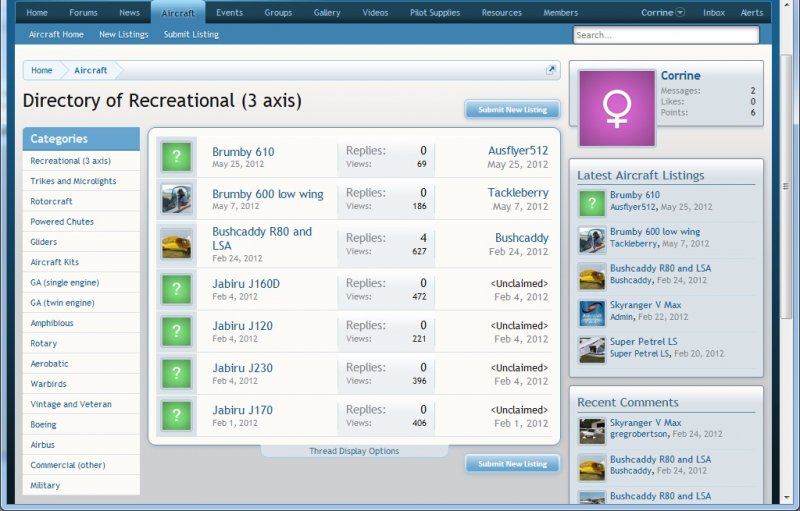
When a user clicks a Category they will see...NOTE, the images I have used here are for Aircraft so ignore the actual information:
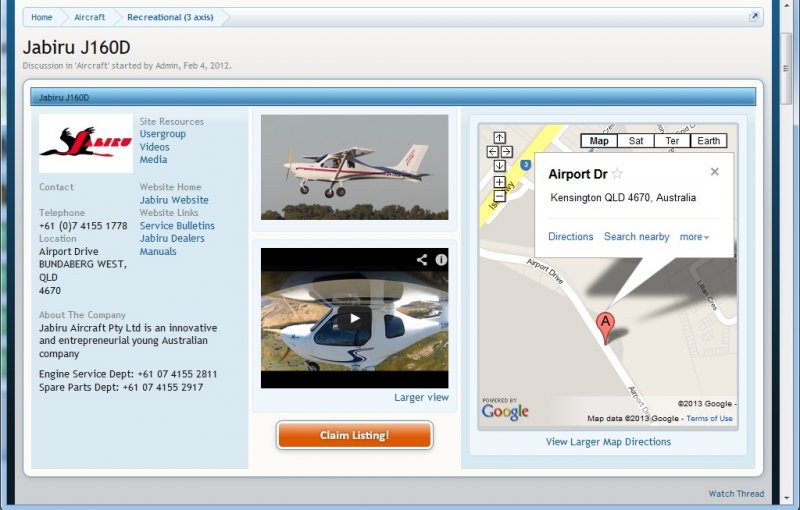
When a user clicks an entry they will see the listing page. Across the top of the listing page is 3 blocks with the Business details, an image and YouTube video (not sure whether to keep these two in there), and a Google Map of the Business's location:
Underneath the top blocks on the listing page as shown above is a section of text (a post) containing all the information about the business, any special deals etc that can be updated by the user at any time, and then followed by a user interactive comments like a forum thread.
The business listing will be entered and can be "Claimed" by the business at any time for them to commence managing the entry.
This was one part of why I was on about the forum restructure making the site more International as this area of the site could be populated with a lot of resources all around the world for all site users
-
One BIG thing to consider when cleaning an aircraft is that if you have a "Plastic" fantastic, using many of these polishes like Mr Sheen etc will cause complications if you ever need to do a small repair. I believe they leave some kind of residue that will have an adverse impact on the repair and that special processes will need to be done prior to the repair. If the person doing the repair doesn't know that you have used these types of polishes then you/they will have problems.
Exactly what all this means I do not know as I am only saying what I have been told but say it to get extra info from anyone that may know more.
The other thing is to only use pH Neutral cleaners...even water isn't pH neutral. More info at:
http://www.composiclean.com/id24.html
Also to see the impacts on washing your aircraft even with just water over a long period of time:
http://www.composiclean.com/id26.html
As a cheap plug, the Recreational Flying Clear Prop Shop carries the Composiclean product range
-
 1
1
-
-
I want to give you a snap shot of a new section of information coming to Recreational Flying for you called the Recreational Flying Business Directory.
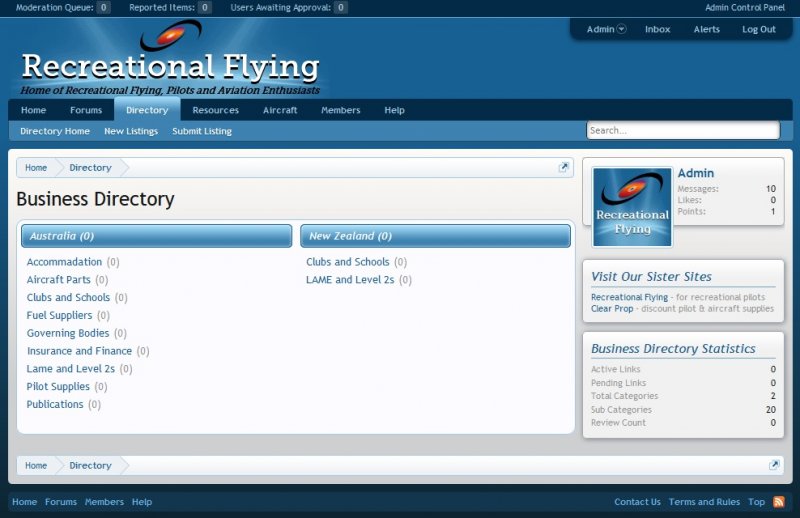
The main page looks like:
In there you will be able to find your Yellow Pages of all things in recreational aviation with the exception of Aircraft (aircraft will be in the new Aircraft Showcase).
What I would like to know is what categories you think the Business Directory should have to make it easy for you to find what ever you need to do with recreational aviation.
What do you think?
-
 1
1
-
-
RAAus News
This week we’re still behind the eight ball, but we are improving. Gary and Paula have not been able to be here every day, but even so, they’ve done a Stirling job at their end.
Caitlin and James are still struggling with their end as we rearrange the office and procedures we’re using. Once they’re used to the new procedures and systems though, I’m expecting to see their productivity increase remarkably. At this time as I write this, I’m hoping to have a new Tech Admin Assistant starting on Monday. The Tech Admin Assistant will be tasked with getting the filing tracking system in place straight up front. We’ve simply got to be able to find files quickly. Once we get that sorted, she/he will be able to handle the incoming query calls that are just killing me at the moment. I kid you not, it doesn’t matter that I take 20-30 calls in a day, there’s another 10-20 that get missed and let me tell you, the guys being missed are not amused. If you’re one of those people. I am sorry, but with everything that’s going on here while we fix this, I just haven’t got enough hours in my life to be able to answer everyone.
Wayne
Tech Manager.
Number of new aircraft registrations processed since November 15th (when CASA reinstated our renewal approval) - 72
Number of aircraft registration renewals processed since November 15th (when CASA reinstated our renewal approval) - 1218
Number of aircraft registration renewals processed during preceding week (ended 10/05/2013) - 42
Number of aircraft registration renewals awaiting the provision – by owners – of additional information - 74
-
Yesterday we announced the addition to the site of a new feature where you can integrate your Facebook and Twitter accounts if you have them with Recreational Flying.
Today, another new feature but this time for ALL users is the new Recreational Flying "Friend Inviter". With this you can use this new inbuilt feature to send an email to your friends inviting them to join you here on Recreational Flying. Apart from the standard email you can use in the Friend Inviter, if you use Gmail, Yahoo, Facebook or Twitter, the Recreational Flying Friend Inviter can also automatically connect to any of these services for you to allow you to select specific Contacts or Friends and send them an invite to join you here at Recreational Flying.
You can also use this great new feature to even see which of your friends are already here on Recreational Flying...perhaps you may not have even known that some of your friends are already here.
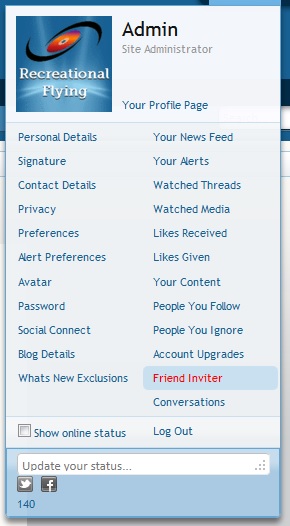
To use the Recreational Flying Friend Inviter, simply hover/click your username in the top right corner of the site and from the drop down list of your Settings and Services, click "Friend Inviter" in the right column:
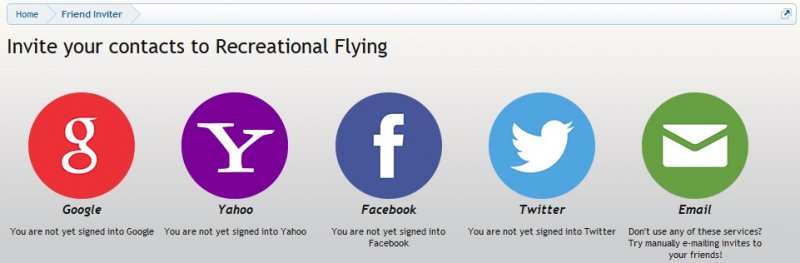
A page will display showing you the different services you can use to invite friends to join you here on Recreational Flying:
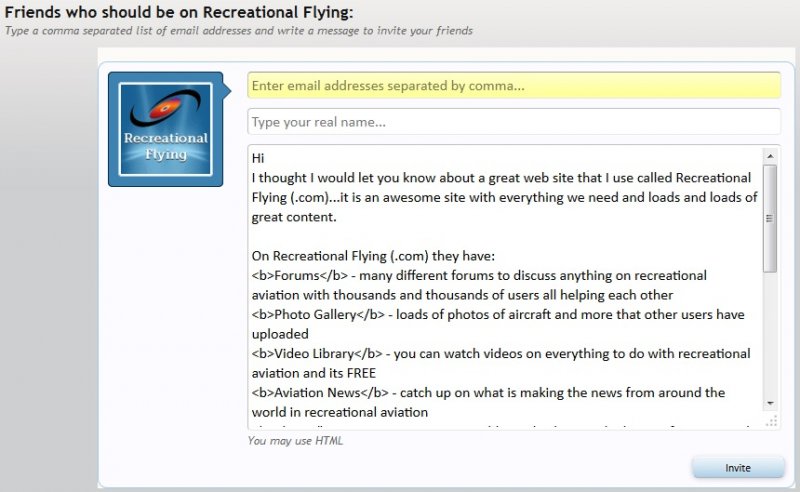
If you click the "Email" icon on the right, a box is displayed where you can send an individual email to a friend...it even has a pre written message that you can use or you can enter your very own message:
If you use Gmail, simply click Google or if you use Yahoo, Facebook or Twitter, simply click their icons. You will be asked if you authorise the App to display your contacts.
You will then see a list of friends that are already on Recreational Flying and then a list of Friends that you can invite to join you here.
This is a great tool that I really hope you will all use to get your friends to join you here on Recreational Flying. So come on, let's build up this community with people you know as well as making even more new friends all with the same common interest of recreational aviation.
Will take a short break on new features but coming soon are:
1. An Aircraft Showcase
2. An Aviation Services Directory
3. Clubs and Schools
4. NEW Resources including articles and "How Tos"
5. A site Support Help Desk...and more
-
There are two new features being added to Recreational Flying today with this first one being for all those registered users that also use Facebook and/or Twitter.
Recreational Flying is now completely integrated with your Facebook and/or Twitter accounts using a new feature called "Social Connect". Social Connect allows you to connect your Recreational Flying accounts to Facebook and/or Twitter.
By doing this, when you post a new thread, update your status or get awarded a trophy, a Tweet and/or Post can be automatically created on your Facebook timeline or Twitter feed. You will notice in many areas of the site, the little Facebook and Twitter icons which, when you use the Recreational Flying "Social Connect" feature, will change colour depending on what you have selected in your settings.
Here is what you can do:
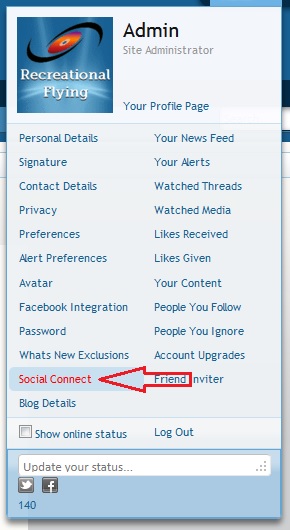
Firstly, you can access the Social Connect settings from your settings drop down box when you hover/click your username in the top right of the site (see below) or from your Account settings:
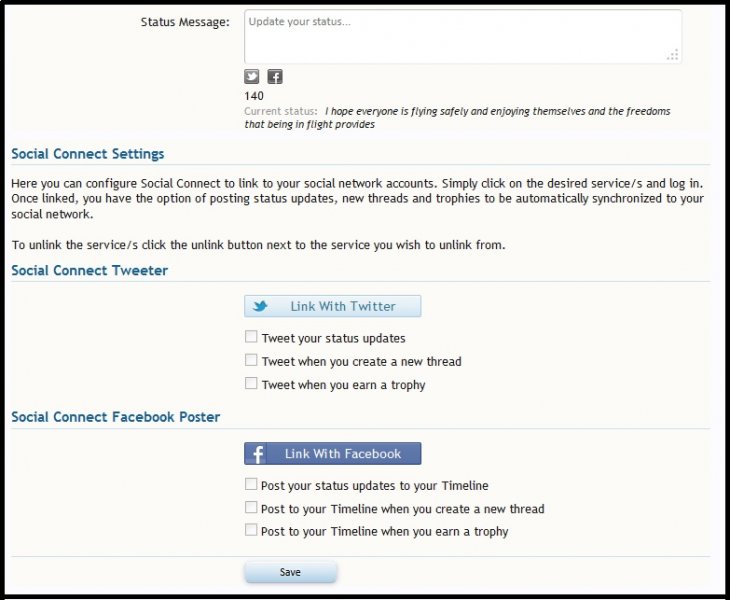
On your settings page, you can choose which service/s you want to integrate and to what level of integration you prefer:
Once you click either the Facebook and/or Twitter Link Buttons, and provide authorisation to link your account, you have several options of how Social Connect can interact with your Recreational Flying account. You can automatically post status updates to your Facebook timeline and/or tweet to your Twitter account, you can post to your Facebook Timeline or tweet to your Twitter account a new thread that you create here at Recreational Flying, or even when you get awarded a trophy...you can choose 3 different options.
While performing different actions on Recreational Flying, you will see what you have selected in your settings represented by one of these icons.
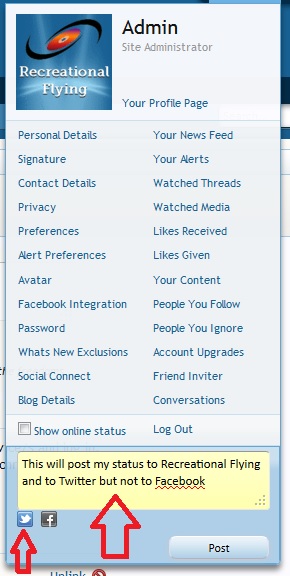
- the normal Facebook/Twitter icons tell you that they are connected and the action will also be posted to your Facebook and/or Twitter pages. - Red icons tell you that you are connected but have elected not to post this type of action to your Facebook and/or Twitter pages - Grey icons mean that you are not integrated with Facebook and/or Twitter at allHere's an example of a status update which will be posted to Twitter, but not to Facebook due to not having the "Post your status updates to your Timeline" option in your Social Connect settings selected:
This what Tweets and Facebook Posts look like (note these screen shots are from the person that we purchased this feature from):
Here's how a status update looks on Facebook and Twitter:
A trophy award:
A new thread post:
I hope those that have a Facebook and/or Twitter account find this great new Recreational Flying "Social Connect" feature a great tool to use here at Recreational Flying ...enjoy
-
Perhaps I am not following what you are after...if there are no new posts in a thread and it disappears off the What's New list then I assume you would only want to go back to that thread for reference in which case there is 4 options:
1. Use a Post-It Note to go back to a specific post in a thread...if you had thought that you may have wanted to reference it later
2. If you have posted in that thread then it is automatically watched and you can find it in your Watched Threads
3. If you didn't post in the thread but thought you may want to reference it again then watch the thread and it is displayed in your Watched Threads List
4. I have spent extra money to get an "Enhanced" search feature for the site so the search function is very powerful...site wide, forum specific, thread specific and even by user and it has no minimum word length so it takes plain English searches.
The thing is how do you know that you may want to go back to a thread/post and reference it at the time you are reading it? If you do, then there are already features that will enable that even down to an individual post, if you don't and you can't tell the future, then it there is no way other than searching for something, a function that we have spent money on to enhance for everyone
-
What I can say is that I have heard a report that it is to do with Aircraft Registrations again, and "potentially" extremely serious as it is to do with previously valid CoA's, however I feel that it needs to be qualified first and then we will have some substance for discussion which is why I said "Stay Tuned"...so let's leave this for now until something/anything/if of substance can be ascertained
-
1
-
2
-
-
You can also "Watch" threads so if a thread is of interest to you even though you may not have posted in that thread to get a notification when it gets updated with another post, you can watch it and still get a notification by email and it also is displayed in your Alerts function.
To "Watch" a thread just simply select "Watch Thread" at the top of any page of posts within that thread. You can also see what threads you are watching by clicking/hovering your username at the top right of the site and in the drop down box on the right column is a link saying "Watched Threads"
-
If I have interpreted what you have said correctly then we already have something like that. Every post has a "Post-It Note" link in it. By clicking that you can create a post-it note of the post including any notes that you want to make about the post yourself plus make it public or private. If you then go to your Profile Details page you will see a tab that lists all your post-it notes in there.I was just reading in a resurrected post from about four years ago, someone asked if the thread could be sticky on top of the whats new list. Got me wondering if that was a good idea because before we know it the first page would be full of sticky threads for various people so they don't lose them. With the new software is it possible for these people to make a favorite thread list to personally sticky their favorite threads? Maybe a tab in their profile details page?Is that the type of thing that you are hinting at
-
1
-
-
-
Unfortunately some of them are strategic and letting them out of the bag now publicly could have impacts on their success...but I can say that one very big benefit to the site users could only happen if the site tailored more to International visitors as well which was the driver of all this. I know it is hard when you don't have the big picture but your comments are taken on-board and considered within the big picture. I can say that it has been discussed with a couple of the moderators though and the areas that are impacted are:What are the new user benefit that are coming and exactly what will be the affects/effects be? This would be a good start to get the conversational ball rolling.Aircraft Owners (specifically the owners)
Clubs and Schools (the Instructors forum is just a small component of that)
Reference Material
Support for registered site members
Aircraft Manufacturers and Distributors
Community interaction
Resources available (big impact in this area)
I have been working on this since Christmas and I had hoped it would set the platform for our future all coming together with our 10th Birthday celebrations next year and it is the specifics of your comments that are taken on board and so greatly appreciated.
Damkia, I will start a PC with you
-
Ok, I have reverted the forums back to the way they were with the exception of the Aircraft section and the Special Interest section. I am so 50/50 on this which is why I continually called for comments. The way the extra user benefits that are coming to the site soon, are set up, depends so much on this decision so your comments are vital in the way the site moves forward.
-
3
-
-
I am currently considering what to do as there are other considerations...I wish these comments came out when I asked not only in this thread but also another one a few weeks ago
-
It is in your settings and is what, in your case, makes the Australian Flag display in your details that are shown on the left of your postsHow do we select Australia? I hadn't heard of this (but may have done it inadvertently) -
Oh, and to answer that question...yesterday I did a query on the database to show all users that hadn't selected Australia in their settings for Country. The disclaimer on this is that not all users have selected a country so they were filtered out. This left a list of 540 users...I once said that I thought the percentage was around 10% so I wasn't far off...it is 7%.Out of curiosity, how many international (outside AU/NZ) members do you currently have?But you have to also know that around 2,500 guests view the site per day and the percentage of those being non Australian is much much higher than the 7% of registered users. This tells me that there are a great deal of International visitors that don't become users and the question therefore is...is it because of the enormous Australian (centric) content of the site and no facility to provide an alternative area so they just read then go?
-
Good thought and have considered this in detail however there are many underlying issues like with Google search bots...they can only access what a standard guest sees when coming to the site so the deeper you go into a site's structure, and sub domains, the harder it is getting correct indexing done so your google search rating drops. Plus using sub domains there is also the issue of Google black listing you due to duplicated content...the whole thing is very complex and you still have the issue of having the extras like Airfields, Clubs, Schools etc as they can only be installed on one instance of the forum software so they have to be all inclusive and not segregated into regions.Out of curiosity, how many international (outside AU/NZ) members do you currently have?Could you use a prefix in the url to determine region ie "au/recflying.com", "us/recflying.com", "uk/recflying.com" to tailor a list of available relevant subforums, and simply leave the "recflying.com" as an all visible? This would then break down the conflicts in trying to include everything, but give some regional "homeliness". Include a linked list of regions in the "recflying.com" home page.You get to have your pie and eat it too...
There is also navigational issues. You could be in au/recfly.com and go to Airstrips which then places you in recfly.com so all links have to be hard coded. Say a user places a link in an au forum to a thread/post in a uk forum. The inbuilt software treats internal links one way and external links another way as in opening up another window...to overcome this would require change to the software source files. The other thing is displaying say the Aircraft category of forums across all sub domains but General Discussion, Accidents etc within their own individual sub domains.
I came up with a solution a couple of years ago and built it on my PC that used the inbuilt function of different Styles. With that I coded the forums list to display only certain forums depending on which style was used. Each region had a different style so when you clicked AU on the forum menu all the general forums came up but plus the AU forums that were set to display for that style. The same went for UK etc. The different regions displayed on the main menu just changed the style when you clicked them. It was so much work and contained many issues as highlighted above especially the linking because if you clicked a link to a forum in a different style to the one you were using you got an error and to overcome the Google issue the Forums default display to Guests etc was set to display ALL forums and that was a mile long which would put any potential new user off.
There is a way...I just haven't found it yet but what you are saying has merit, but just a lot of complications...a big thanks for the thought.../Ian goes off to explore the idea
-
There is always a "B" plan...that is to move this site back to .com.au and have it the way it was before and purely targeted to Australia. Then create separate sites for the UK, USA, Canada etc but it is so darn hard to start a site off and takes a long time of constant focus to get them going...it is a catch 22, people come to the site for content who create more content which gets more users etc etc etc so starting a site is extremely hard without content and users. The other negative to that is that you don't end up with one huge repository of helpful information to all but rather spread across separate sites. But a positive is that the site can be tailored specific to the region with some great extras developed for that region (Airstrips, Events, Articles, News, Clubs, Schools, People, Places etc) and a more "community" element comes out.
So is that what you want?
-
So here we have 2 different opinions and I agree with both. When trying to work out the best solution with Accidents I knew that it would be wrong to have just one forum for them given the different legalities plus the thread titles that are used like:
Fatal Crash at Taree
Emerald Qld - Virgin does go-around to avoid light plane
Fatal Incident at Parafield...
Now one near a school! Ballarat
and then there are ones that are like:
CTSW Flips on landing (an accident thread of interest to all CTsw pilots)
The intent of the Accidents forum was that it be used as a learning tool...although they are other aviators misfortunes, there are always elements that we can all learn from to help keep us all safer. The other thing is that the threads always have an element of geographic location. There is also the desire to keep the forums as compact as possible instead of having a forum for this, a forum for that and forums for everything else. So it was hard to try and determine the best compromise. The geographic element of an accident, the desire to keep the forums list as short as possible, the legality/governing body aspects of an accident all hinted at having them discussed in General Discussion per region and hence this is what was done after user comment was called.
The alternative is to either have a separate forum for Accidents as it was but then there is the legality/governing and geographic issue as the site tries to entice more and more International users.
This only leaves the option of having a separate Accidents category with geographic regions as sub forums the same way that is now done with the Events/Trips and Spare Seats category and sub forums. This covers:
- separate forum for Accidents
- legality/governing issues are kept within their own region of accidents
- geographic elements of an accident thread are also kept within their region
But it then requires an extra category and sub forums further extending the forum list and adding more complexity to site usage although somewhat softened by the already existing format of the Trips/Events and Spare Seats forums.
That is the dilemma and possibly the best option is to have an Accidents category with geographic regions as sub forums like the Trips/Events is done...as always, open to comment
Nothing on this site is done for no reason, there is no change for change sake and in fact over the last year there has been no change however when ever a change is proposed, it is always communicated to you all and it is always accompanied with a pleading for comments and without them I can only do my best with what I think I know
-
:crying:why didn't you say this when I was calling for comment...good point and understand that but can I take it under advisement at the moment...and can I put to you the question of whether there would be interest on accidents in other countries? For example if there was a separate Accidents forum again, what would you think if there were mixed in there accidents from all around the world...or would you only be interested in accidents in Australia? There are more accidents in the US for example than Australia and then add UK accidents in there as well not to mention those in South Africa.







Happy Mothers Day
in Site Announcements
Posted
To all the mums out there, the mothers of us recreational pilots and to those mums who are recreational pilots...have a great mothers day, and thanks for putting up with us