


Admin
-
Posts
9,322 -
Joined
-
Last visited
-
Days Won
110
Content Type
Profiles
Forums
Gallery
Downloads
Blogs
Events
Store
Aircraft
Resources
Tutorials
Articles
Classifieds
Movies
Books
Community Map
Quizzes
Videos Directory
Posts posted by Admin
-
-
Here is a little tease of an enhancement in the upcoming site update...
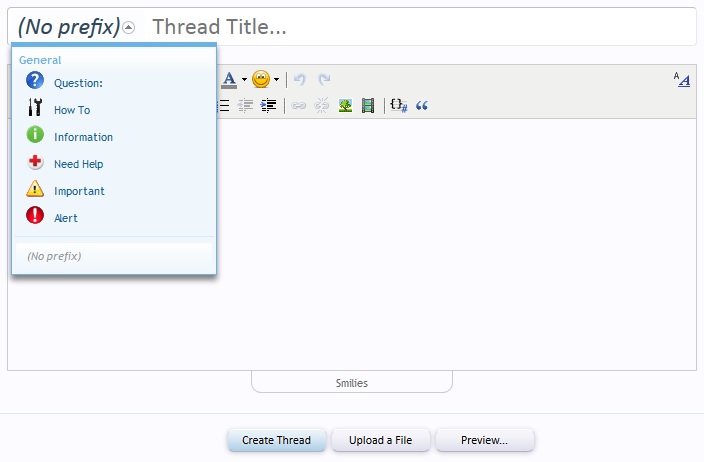
As you know when creating a thread you can select a Thread Prefix for it. I have always thought the current ones look daggy so they have been redone to show icons which I hope will make thread prefixes look more professional...here are some screen shots:

-
I can't believe I wrote stainless steal...not sure what I was thinking at the time...must be something in the water here at Happy Valleyer - I know you meant to say Solid State Drives.Not much call for rust-free disks.No moving parts on SSD = no problem with rust.
The stupidity still continues...after a scathing email to the data centre saying how long it has taken me to get the server backup and sites uploaded, checked and working, they reply with "Please let them try and recover the data from the 5th disk for me"...WHAT, I think the horse has bolted and is half way to Timbuktu by now
-
Thanks FT...nothing against you but security is my biggest concern with where the data is and who has access to it...I won't let it leave my sight...so to speakNext time you need some short term off server backup let me know. -
It may well be the "easiest" but still risky and extra costs. (remember I am still unemployed and every cent I can spare goes on this site), the planned method would have seen the site restored within half an hour as the 5th disk is even better with it being in the box and after the server was rebuilt, we would have been back live at around 4pm...I would even have had the time to tell the data centre to do it again with the most recent operating system...why put up with say Windows 95 when you should be using Windows 7...as an exampleThese easiest way to dump mysql is across a network, once you have your new server up to date run mysql slave on it and let the old server run as master. when you are ready to go live just disconnect the old server.Doing it by files blows big time.I wouldn't use linux's journaling file system in raid, asking for trouble.
My advice: Take tuesday off!
-
Sorry, I am very testy at the moment...getting professionals to do a job
they wiped our bloody backup disk and then they reload an older version operating system On Saturday there was 11th hour discussions with the data centre about suspending the update and moving to a more powerful server using newer processors and new drive types of SSD (Solid State Drives) rather than the 4 15,000 rpm RAID10 disk setup plus 5th hard disk for backups that we use now. BUT their sales people said to come back Monday and let's talk...it was going to cost us an extra $25 a month. So with everything scheduled, money paid and resources booked I thought it better to stay with what we have now and chalk that up for another day.
The data centre was advised that the backups would be made starting at 10:00am our time and they would be backed up to our 5th backup/emergency disk so after the update, the sites could simply be copied back/restored from a hard disk that is physical in the server. Having had many years experience with IT people, I knew it would be prudent to also take a complete backup of all the data and download that (3gig worth for this site and another 2gig of data for other sites) to my own PC here at home as a form of "Disaster Recovery".
The normal backup regime I have is backups of everything on the server including the operating system and config files is done daily and stared on the 5th disk. Approximately once a month I do a disaster recovery backup and download that to my PC. This is then installed into a mock up web site on my PC to verify the backup before it is then transferred to a 1 terrabyte portable hard disk and stored in a safe place.
At 9:45am I closed the site and started my disaster recovery backup and down load. I contacted the server admin company that monitors the server being up every 5 minutes advising that the server will go down and not to intervene. I contacted the server admin guy who will be doing the software apps reload to confirm he is ready to go. I contacted the data centre to confirm they are also ready to go. Once my disaster recovery backups were completed I got the server admin guy to backup the server to the 5th disk...at 11:45 he replies that there was an issue and delay for 2hrs. I contacted the data centre to delay for 2hrs. The server admin guy came back at 11:55 saying all was good now. I advised the data centre to ignore the 2hr delay and proceed as normal at 12:00pm.
The data centre's pessimistic time frame was 2 hours (most likely time was 1hr) to reload the operating system and some apps. 3 hours had passed when the server was finally operating. Naturally when the server was dumped, my email stopped working however I had established a secondary email address and communicated that to everyone...but they never used it. When they advised me that the server was done, that was when all hell broke loose...this was their reply to my job ticket:
The reload has been completed and xxx has been installed. In the course of reload, all drives were unfortunately reinitialized so you will have to use your back up from your local home computer. We apologize for any inconvenience this may have caused.
WHAT...ALL DRIVES REINITIALISED...holly sh!t and they say "unfortunately"...this was a major mistake on their behalf and they knew that backups were on the 5 disk as I had communicated that to them when I said I had also taken a disaster recovery backup to my PC which they quoted in their reply.
This now meant that I had to manually upload the 3gig of this site's data (plus another 2gig which I haven't done yet for other sites like the shop etc). The upload speed from here to the server was lucky to get 75k/s. Plus the biggest issue is to import nearly 800meg of data into the database which due to database import file size limitations meant I couldn't just import the data into the database. I installed a program called MySQLDumper which takes a small number of records and "spits" it into the database and with over 1.5million records takes hours to do. After the first hour of uploading the backups it all collapsed because the server admin guy was still setting up all the other applications the server needs and optimising things so had to start again.
Finally by 2am the site was up and checked, email was restored and redirects from other domains were restored.
So much for bloody professionals...if I hadn't taken a disaster recovery backup the best you all would have ended up with was a nearly 1 month old backup...and we now have an older operating system than what we had before...there is going to be some mighty backlash for the data centre over this...anyone want to buy a website because I have had enough of doing this........................today
-
We do not use VPS as we have outgrown VPS hosting...we use our own dedicated server i.e. the complete server, hard disks, ram, processors...everything, is completely ours and no resources are shared with anyone else.no. the big thing in low cost hosting now is VPS. You can a lot of sites of a single machine, the server aren't tied to the hardware so its easy to move them from one machine to the other. All makes for low cost low hassle hosting. -
Finally, the site is back up...still some cleaning up to do but more later
-
 1
1
-
-
Are you using an iPad or mobile device?Still not able to use smiles or do have any icon at the screen ! -
Will do my best...although I will be out mowing the lawn etcOK, I'm off to work, better have it back up by the time I get home.No pressure! -
I have had a report that a user is unable to see the videos in this thread...I am seeing 3 videos in 3 posts myself using Firefox, as a guest using Internet Explorer and logged in as a standard user in Internet Explorer.
Can anyone else confirm that the videos ARE being displayed?
-
It has started...Aircraft Pilots is shut down, the Clear Prop Shop is shut down, everything else is shut down except for just this site and Jackaroo.com.au which is for email...so everything is done and prepared...perhaps today is a great day for a fly
-
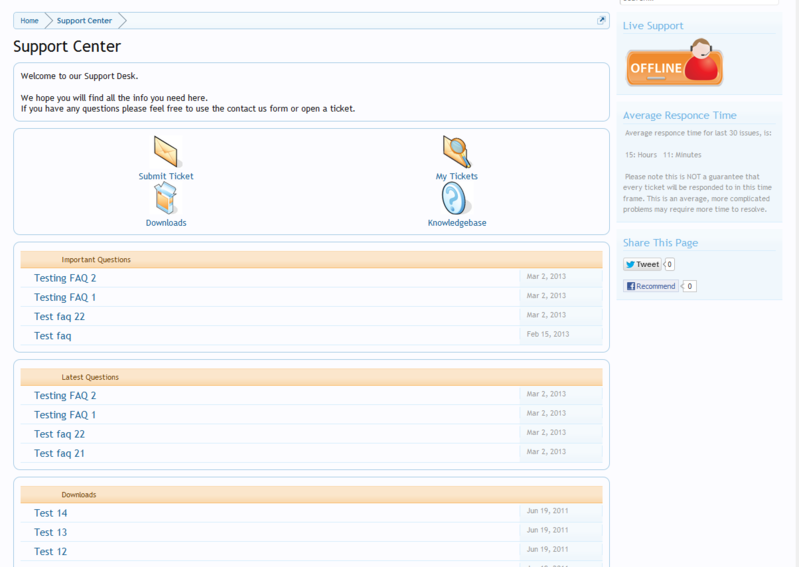
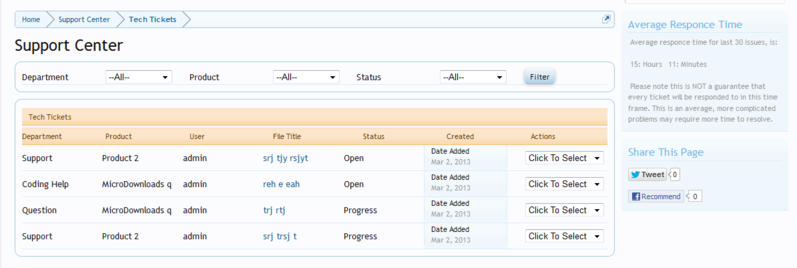
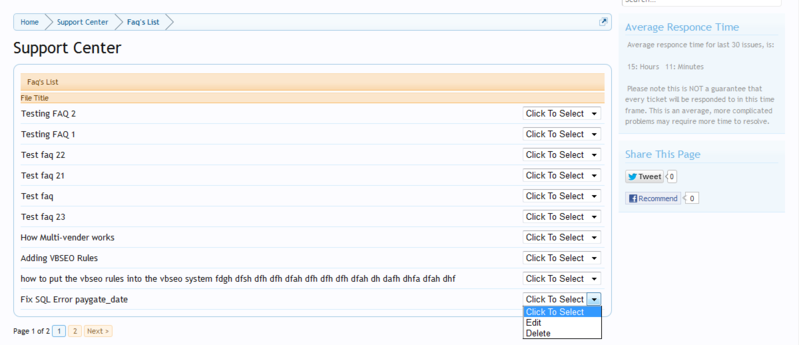
Software has already been purchased to include a complete support Help Desk for users in the upcoming site upgrade. The Help Desk has support tickets, FAQ and predefined answers for myself and the moderators to answer commonly asked questions. Here are some screen shots of the upcoming Recreational Flying Help Desk User Support System:Sorry to say but it's as clear as mud! Too fast for my aged brain,Phil -
Hi All
You're killing me...lately many posts seem to have images included in them that are linked and are large in size rather than using the site's inbuilt image upload and thumbnail capability.
Having images full size in a post hurts every user by increasing their bandwidth usage, slows the display of the page right down for many site users not to mention the extra bandwidth the site has to pay for.
It is ALWAYS better to instead of doing this:
to do this instead:
so users can click on the thumbnail image to view it and when they are returning to the page to say read an extra post that has been added to the thread, that they don't have to reload the full image that they have already seen again...also makes the page display a lot lot smoother for everyone.
Here is a video on how to add pictures to your posts:
[media=vimeo]15251966[/media]
-
 2
2
-
-
A couple of things will not be up and running instantly upon the site coming back up:
1. The advanced search system we use here on Recreational Flying may take a day or so to come back up...in the mean time the site will use the standard search that most other forum sites use i.e. MySQL built in search
2. The Video/Audio/Text Chat Room will not be functional for maybe a week or so. When it does come back up it will be an updated version and configured so ALL sites on the server i.e. Aircraft Pilots, Clear Prop etc will all use the same chat room instance PLUS the "Users in chat" that is displayed in the right column box of the main forum page will be removed and the number of users "currently" in the chat rooms will be displayed in a red box next to the Chat Room link on the Forums sub menu bar so you can see it at all times wherever you are in the forums the number of people chatting in the chat rooms
This upgrade will also provide a better platform for the upcoming major site upgrade that has been getting developed over the last couple of months. However, currently development on the site upgrade has been temporarily suspended whilst a decision is made regarding some elements of the site's direction and integration.
-
Google's Android now owns more than half of the US market of smart phones...nearly 10% more than Apple:
-
Hi All
Here at Recreational Flying we place a high value on communication to you all on anything that impacts the operations of this site.
This post is to advise that this Sunday (7th April 2013) at approximately 10:00am Melbourne Australia time, this site will close and will re-open some time later that day.
Our server is in desperate need of some maintenance including the upgrade of just about everything that is on it. The forum database has grown to over 800meg in size now and needs to be further optimised. The site's popularity, whilst is great, also places greater strains on the server so along with newer versions of software, the server needs to be tweaked further to accommodate a better user experience. So the plan at this stage is:
10:00am -Site closes, backups performed and stored on our spare emergency/backup hard disk with secondary backups downloaded to my own PC
12:00pm - Server is wiped clean and complete new Operating System installed
1:00pm - System applications, database engine etc installed and tweaked for increased performance
2:00pm - Site files and databases restored from backups
??? - site reopened
It is hoped that the restoring of the site from the backups should only take a couple of hours and to help ensure the site is down for the minimal amount of time I am paying (thanks to NatFly sales) for a highly qualified and experienced Server Administrator to perform the actual work...he is far superior in this type of work than I am.
Everyone here at Recreational Flying apologises for any inconvenience that this maintenance work causes you however it is much needed.
Thanks for your understanding.
-
 3
3
-
1
-
 1
1
-
-
-
-
It's about time we brought back some competitions on the site...so here is the first one which will close at the end of April.
First prize is for a DVD
Most of us have avatars on the site so let's see who can be the most creative, funniest, artistic etc by including either the site logo or the words Recreational Flying in their avatar. It can be on an aircraft, or in a picture of a hangar or ???
Here is a copy of the logo you can download and insert in your avatar:
The rules:
1. To enter you have to add a post in this thread showing your avatar with the Recreational Flying Logo or the words Recreational Flying incorporated into it.
2. The avatar can not just contain the logo or words...one or the other has to be incorporated some way into the avatar
3. The best or funniest will be judged by the site Moderators
4. Only open to Australian users for shipping of the first prize DVD
Note: The site allows avatars to be uploaded at a max size of 200 pixels x 200 pixels (your profile displays them at 200x200 and they are automatically resized to 100x100 for posts) and a max file size of 25600 bytes
So come on, join in and have fun...let's see some great avatars
-
A moment in your life you will never forget...congrats and well done
-
1
-
-
...will someone give the man an aircraft to build...he sure has too much time on his handsDoes this mean the bull won't be around for hefer and hefer? -
We are ALL GA pilots and if we don't get paid to fly then we are also ALL recreational pilots...that's my thought
-
-
That one is painted red Guernsey...come to think of it the last time I saw it was at NatFly when it was at Narromine several years ago:A UFO ?










Site Shut Down
in Site Announcements
Posted
An update...
We are going to have to go through this all again however it will have a much smaller impact on site down time. We have to go through it again to at least get back to an operating system that is recent however instead of doing it all again on our current server, we will be moving to a much better and faster server instead. Not only is the new server much quicker and more modern, but it will allow us to set the new server up exactly as we want it with the latest software, tested and fully operational before we migrate the sites over to it.
Migrating sites from one server to another is much quicker which means less impact on you the user. The only unknown at this stage is when it will get done. I would like to have it done during one night however I need to decide whether to do it myself, which means it can get done during the night, or engage my server admin person once he has set the new server up, to handle the migration as well. This means the migration would need to be done during the day on a Saturday or Sunday.
The specs on the new server are still being worked out but will either be:
LA based server:
Processor: i7 3930 (12 cores)
Memory: 16gb RAM
Hard Drives: 2x300gb Intel SSD in RAID1
Backup Drive: 1x1tb SATA II
Bandwidth: 10TB Premium Transfer
IP Addresses: /29 (5 useable IPs)
Port Speed: 100mbps
Las Vegas based server:
Processor: Intel Quad Core E3-1230 v2 (8 cores)
Memory: 16 DDR3-1333 ECC RAM
Hard Drives: 2x256GB Samsung 840 SSD in RAID1
Backup Drive: 1x1tb SATA II
Bandwidth: 10TB Premium Transfer
IP Addresses: /27 (29 useable IPs)
Port Speed: 1000mbps (GigE)
My concerns in deciding which server at this stage are:
LA server processor is desktop grade whereas LV server is server grade BUT LA server processor is faster than LV server
LV server ram is server grade compared to LA server
LV server port speed is 1gig compared to LA server 100mb
LA server in LA is closer to Australia than LV server
The LA server is with the data centre that stuffed up last weekend
LA server is $35 a month dearer
LV server has 10m/s longer ping time
I have never heard of the LV server data centre
Will keep communicating to you as to as and when things will happen