
Admin
-
Posts
9,328 -
Joined
-
Last visited
-
Days Won
110
Content Type
Profiles
Forums
Gallery
Downloads
Blogs
Events
Store
Aircraft
Resources
Tutorials
Articles
Classifieds
Movies
Books
Community Map
Quizzes
Videos Directory
Everything posted by Admin
-
I still have the old Blogs and a new Blog solution is coming however I need to get the Aircraft and Tutorial section transferred over first
-
Over the next couple of weeks I will be bombarded the Showcase and Resources section with the records from the old software that could not be imported automatically. These records will be entered manually through copy and paste so the red counters that show new unread records in these two sections will be showing high numbers until you read or "Mark as read" the new records. In a couple of weeks these will settle down so sorry if there is any inconvenience.
-
Bernie, I am sorry but I can't help you any more other than advise what you need to do i.e. delete any Recreational Flying cookie and clear your device cache. If you are here in Melbourne and can come over to my place I can do it for you. Try going into a computer store and ask around any where you are if anyone knows how to help you. 95% of users have not had any issue but for some reason just a few have had the same issue but are now all working ok. Try going to a PC, a friends PC as an example and that hasn't ever been to the site and try logging in from that. Also check the link you are using to access the site: https://www.recreationalflying.com/whats-new/posts
-
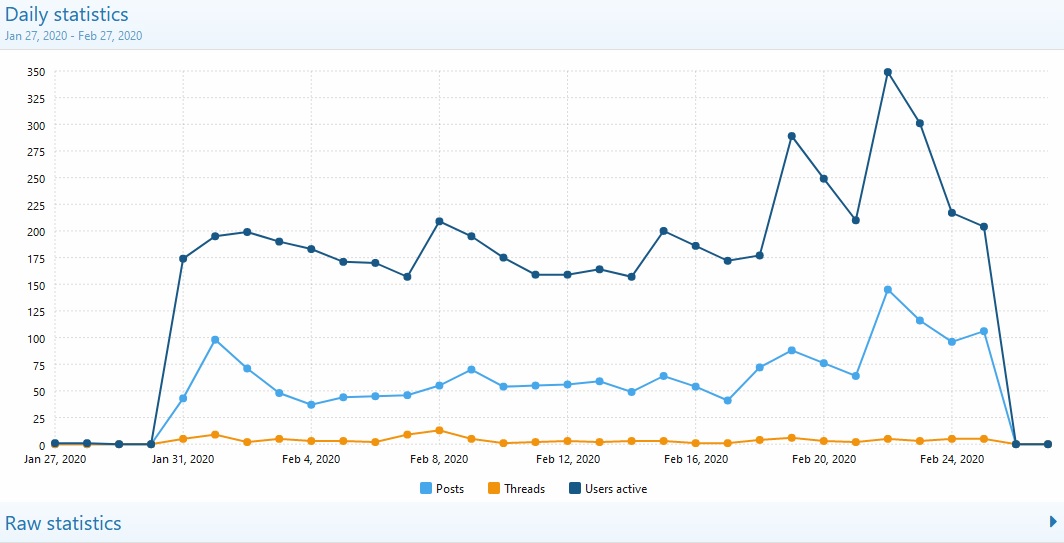
It is looking like it was the right decision to come back to the Xenforo site software and whilst there is still a lot of work to do in building the site back up the statistics are starting to show a positive turn. Note though the sudden increase was caused by the mid air accident at Mangalore on the 19th however the trend outside that is still looking a little positive. One thing we need to encourage is the creation of many more threads on any kind of aviation subject:

-

information Google Map showing location now in Classifieds
Admin posted a topic in Site Announcements
When entering a Classified entry here at Recreational Flying, the location you enter into the Location field will now show up in a Google Map with your entry. Remember Classified listings here at Recreational Flying are FREE to list -
I have created a feature which allows you to easily create a Google Map of an address you add to a post. All you need to do is simply: 1. Type an address in your post, for example 16 Powley Pde Watsonia 2. Highlight the address with your mouse 3. Click the Google Map icon in the post toolbar and a MAP tag appears at the start and end of the address 4. Just submit your post as normal and this is what you get: [MAP]16 Powley Pde Watsonia[/MAP]
-
That's great, thanks for letting me know
-
All the Whats Up Australia Off Topic site users have been migrated into their corresponding user logins here in Recreational Flying. This means all the Off Topic posts are attributed to the same users here so those users that posted on the Off Topic site will see their post count has increased accordingly and their Private Messages merged.
-
Thanks Mate, but at 60 it is getting harder
-
Sorry everyone but as many will have found the site went down this afternoon, in fact every single site on my server went. I am getting too old for this...I was deleting a folder on the server and I went to the folder but unbeknown to me I was still in the root of the server and I deleted every single domain on the server. I contact my server guy who is based in the UK but naturally he was asleep so I had to wait for him to get up and he then was able to restore everything. So sorry to anyone that was trying to access any of the sites this afternoon
-
AEROPRAKT A32 Training Bay of Islands Aero Club
Admin replied to Wiri Hiore's topic in Just Landed - Welcome
-
-
-
Please note that the Off Topic site Whats Up Australia has now been migrated here into Recreational Flying. Clicking any of the Off Topic menu links will take you to the Off Topic forums. The Whats New page of Recreational Flying will NOT show any Off Topic threads or posts. There is a bit more work to do though...when migrating all the users of Whats Up Australia into Recreational Flying there are a lot of duplicates, naturally, so the users have had "1" added to their user names. I have to now manually one by one merge the Whats Up Australia user to their corresponding user in Recreational Flying. So for example Whats Up Australia user "Facthunter" has been imported into Recreational Flying as "Facthunter1". The user "Facthunter1" will be merged into the user "Facthunter" and this will take a day or two...there are about 350 users with the "1" attached
-
Some users are having site issues which can be caused through Cookies and/or Browser Cache. If you are having a major issue please try this first: 1. Clearing Browser Cache: https://clear-my-cache.com/en/windows.html 2. Delete the cookie for Recreational Flying: https://www.lifewire.com/clear-cookies-for-one-site-4587347 If this does not work please contact me for help over the phone on 0412 881108 (not between 7:00pm to 7:30pm...Home and Away is on TV )
-
It has now been suggested that the issue could simply be an outdated browser cache that the user may be using. So, if that is the problem then it is easy to fix by simply clearing your browser cache. Please can someone who is having issues follow the following instructions and then let me know if it fixed the issue...thanks: https://clear-my-cache.com/en/windows.html
-
Hi @FlyingVizsla I am guessing you are unable to access your Private Messages so here is what I sent you: Hi, I was hoping you could help me to resolve the site issues you are having. Firstly I need to rule out your PC so can you log in to the site from a PC that has never been used to log into the site before and see if the issue still exists, use a friends, work or neighbour PC and then let me know the outcome...thanks @waraton can you do the same. I need to isolate the issue to user PC, our server or the site itself
-
It has been getting developed for a while but it is getting closer to releasehttps://www.youtube.com/watch?v=10P21oFOxAU
-
I didn't do anything Marty as I was waiting for your reply to my private message
-
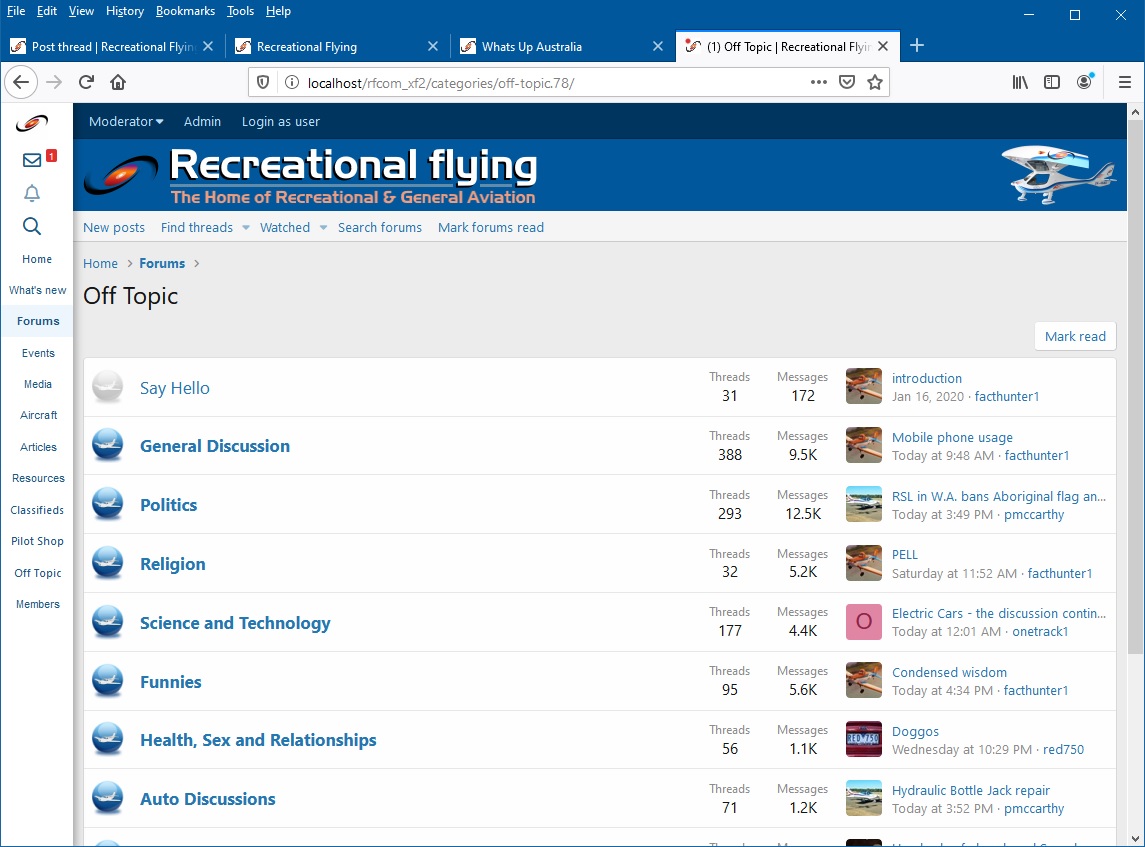
With the software license renewal approaching in the next few days for the Whats Up Australia site, the site that we use for Off Topic discussions, I have decided to bring it back into this site and close the Whats Up Australia Off Topic site. There will be forums for: General Off Topic Politics and Religion Science and Technology Health, Sex and Relationships Auto Discussions Sports The Funnies in Whats Up Australia will be merged with the Aviation Laughter forum and simply called Laughter (unless I can think of a better name) The What's New section of this site will not include ANY Off Topic posts and unfortunately at this stage I am unable to come up with a solution to have a separate Whats New for Off Topic but I will see if I can get something developed. In the interim when a user clicks on any of the Off Topic menu links they will see a page of the Off Topic forums with the forums with new posts in bold: Any comments are appreciated
-
As suspected it seems that I have to convert the site back to absolute default and see if the problem still exists so @Marty_d and @FlyingVizsla if you can help me with this it would be appreciated. I will strip the site bare today and could you let me know if you are still having any issues...thanks
-
Thanks Marty, I have lodged a ticked with Xenforo so I am waiting for their reply although I do expect them to just say the site has to completely reverted back to stock but let's wait and see what they say first...will let you know
-
-
-
To any user that is experiencing the combined issue of getting an "Oops" error when trying to like something and having an issue when trying to add an attachment...I need to test something with you but it requires me to be on the phone with you at the time as I need to remove all enhancements that I have added and add each one back one at a time while you try again. Please if there is anyone who can help me with this then let me know as it will be greatly appreciated...thanks